Updated on 06 Mar 2012
By Anthony Buckner
970 KB Safe To Install
Advertising


Specifications
License:
Shareware (Free to try)
Updated:
Downloads:
1087
Platform:
Windows (All Versions)
Publisher:
PDF Bean(more)
Website:
User Reviews:
Other versions:
2.01, 2.00, 1.01
Do you like
PDF Ripper?
Publisher's Descriptions
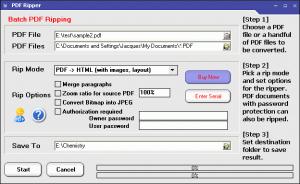
PDF Ripper is efficient software to extract image, text, chart, formula, vector drawings from Adobe PDF files. With this program, you can easily collect materials from existing PDF documents, and save them into HTML format, RTF format and plain text format. If you are looking for a converter program to convert PDF to Word, PDF to RTF, PDF to HTML, PDF to Text with a minimum loss of information while preserving the layout and graphics of the original PDF documents, you shouldn't miss PDF Ripper. Batch extraction and conversion are supported. Options such as to adjust zoom ratio, merge paragraphs, set password for encrypted PDF files, optimize images and output file size, embed PDF document information are provided. PDF Ripper supports all PDF standards from PDF 1.0 to PDF 1.5, and it does not requires Adobe Acrobat or Microsoft Word, since it is standalone and loyalty-free.
System Requirements
Win98, WinME, WinNT, WinXP, Windows2000, Windows2003
What's New
Convert PDF to Word, PDF to RTF, PDF to HTML, PDF to Text


Do you like PDF Ripper

PDF Ripper Disclamer
Please be aware FindMySoft.com accepts no responsibility for the file you are downloading. The same applies to the information provided about the software products listed.
We do not allow the inclusion of any PDF Ripper serial, keygen or crack and we disclaim any liability for the inappropriate use of PDF Ripper.
FindMySoft advises that PDF Ripper should be only used in accordance with the rules of intellectual property and the existing Criminal Code.
For your own protection ALWAYS check downloaded files for viruses.
Advertising
Popular News
The free AboutOne app is currently exclusive to Windows Phone. The app is available for free in the Markeplace.
Google rolled out Chrome 19 to the Stable Channel. This version fixes some security problems and adds tab syncing capabilities.
Your Rating
0.0
out
of
5
Rated By
0 Users
PDF Ripper Screenshot
Top Downloads
Become A Fan!
Link To Us!
PDF Ripper
HTML Linking Code
Latest Reviews


